


If you’re running a Blackboard environment right now, you’re sitting on a free trial of something that’s going to cost you money after June 30th, 2026. Blackboard has made its premium AI features available at no charge in production environments through the end of June. After that, they become a paid add-on. So before you walk into that budget conversation or sign a contract addendum, let’s actually talk about what these tools do, where they shine, and where the development team still has some homework to finish.
I’ve spent time in the tools. Here’s my honest assessment.
What We’re Talking About
The premium AI suite lives under the AVA umbrella. AVA, now officially branded as AI Virtual Assistant (it was Anthology Virtual Assistant), encompasses four distinct capabilities:
- Rewrite Submission Feedback — AI-assisted rewriting of instructor feedback
- Generate Attempt Feedback Summaries from Rubrics — AI-generated overall feedback based on completed rubrics
- Responses to Student Messages — Automated replies to student course questions
- AI Playground — An exploratory AI chat environment for instructors and students
Let’s go through each one.
Rewrite Submission Feedback
The idea here is sound, and the execution is mostly solid. When an instructor is providing overall feedback in Flexible Grading and enters at least 30 characters of their own commentary, a Rewrite option appears. The instructor clicks it, AVA generates a more polished, student-friendly version, and the instructor can accept, reject, or regenerate from there. A banner flags the output as AI-generated, which I appreciate—at least it’s labeled.
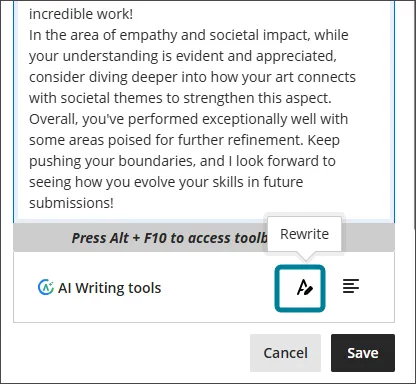
The ability to run multiple rewrites in sequence is genuinely useful. Instructors can iterate on the output rather than being stuck with a single take that doesn’t quite capture their intent. That’s the right design philosophy.
Where it falls short is revision history. Right now, the tool only preserves one version back. If an instructor runs three rewrites trying to chase down the correct tone, and the third one is worse than the first, they’ve lost that original. I’d push for up to five version checkpoints, enough to let instructors navigate back if the AI takes a wrong turn or hallucinates its way into something unhelpful. I’ll have more to say on a related concern when we get to the rubric tool, but for now: good start, needs some safety net refinements.
Generate Attempt Feedback Summaries from Rubrics
If your institution has invested in quality rubrics, this feature finally makes that investment work harder. Once a rubric has been completed in Flexible Grading, instructors can use the Summarize option to generate overall feedback that pulls from the rubric criteria, selected performance levels and their descriptions, and any criterion-level comments already entered. Any feedback already in the text editor gets folded in as well. Like the rewrite tool, instructors can accept, reject, or regenerate.
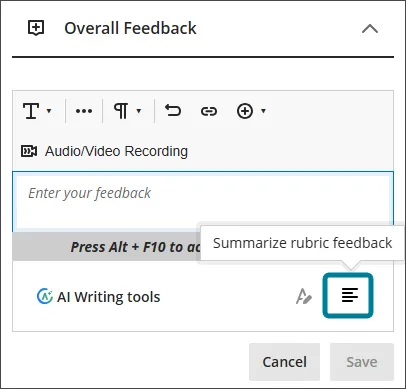
A well-built rubric is already doing half the feedback work; this just closes the loop. Institutions that have pushed faculty to develop meaningful rubrics with substantive performance level descriptions are going to see the most value here. The output is only as good as the rubric behind it.
Here’s the miss, though, and it’s a significant one: the AI cannot read the student’s actual submission. Good feedback doesn’t just evaluate in the abstract; it points to specific moments in the student’s work. “Your argument in paragraph three lacks supporting evidence” is useful. “Your argument lacked supporting evidence” is generic. The inability to surface and reference actual submission content means the generated summary will always feel somewhat disconnected from the student’s experience. That’s not a minor quibble. It’s a limitation that caps the ceiling on this feature.
The broader conversation about AI-generated feedback disclosure is one administrators cannot ignore. I’ve heard the concerns from practitioners on two levels. First, there is the accountability question: how do we ensure instructors are meaningfully reviewing and iterating on AI output rather than just clicking “Accept” to clear their queue? Some faculty have even asked if Blackboard could surface data flagging when AI-generated feedback is delivered without modification. That level of oversight is a thorny issue, but it’s a conversation currently happening in the field, and institutions need to stake out their position. Second, and more critically, students have a reasonable expectation of knowing when the feedback they’re reading was generated by a machine. Transparency matters. Leveraging AI in the assessment loop introduces real institutional risks, ranging from inaccurate feedback and the erosion of student trust to concerns regarding PII and general disclosure requirements. Deciding how to communicate AI involvement (whether via the syllabus or directly in the LMS) is a policy decision that needs to be settled before these features go live, not after a student raises a formal complaint.
Responses to Student Messages
This is the feature I’ve been waiting for someone to build well, and Blackboard has largely done it. The pitch is simple: students constantly send messages asking about things that are already in the course, such as due dates, grade weights, and content locations. AVA intercepts messages sent to the instructor role, scans the course from the student’s perspective, and sends a relevant automated reply before the instructor ever has to touch it. The instructor can review all AVA responses, and add context, and the feature defaults to off at the course level, requiring instructors to opt in.
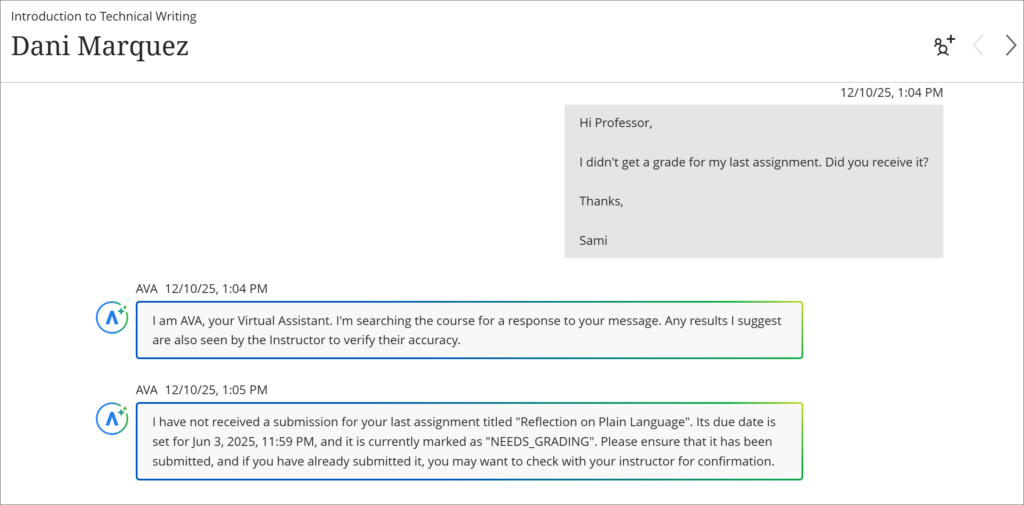
Putting the instructor in control of enablement is exactly the right call. It aligns with Blackboard’s stated AI philosophy of keeping the instructor at the center of AI usage in the course. An instructor who wants the tool enabled gets it. An instructor who doesn’t won’t have it imposed on them. This level of granular control—allowing for training and intentional adoption—is what ultimately separates successful institutional implementation from a total faculty revolt.
The time savings potential here is real and quantifiable (in theory). AVA won’t respond to group messages or when the message goes to non-instructor roles. It pulls from what’s visible to the student: due dates, grades, accommodations, exceptions, and progress data if tracking is enabled. If it can’t find an answer, it tells the student to wait for the instructor. That’s a reasonable fallback.
The student experience with AVA remains a significant unknown in the broader implementation strategy. While the service provides students with immediate responses and consistent feedback loops when they need them most, the risk of trust erosion is real. Student confidence in AVA can evaporate the moment a response appears incorrect. When that happens, you haven’t just failed to answer a question; you’ve created a new layer of confusion for the student and a higher support load for the instructor, who now has to perform damage control. I’d like to see more rigorous research into student confidence levels alongside a granular reporting dashboard for instructors that breaks down AVA’s hit rate, showing exactly where replies were accurate and where the model missed the mark.
But the absence of source customization is going to create problems in the field. Consider a scenario every experienced admin has seen: an instructor uploaded a syllabus at the start of the term with placeholder due dates they never updated, but the actual assignment due dates in the course are correct. AVA will serve up whatever it finds, including that stale document, with no way for the instructor to exclude it from consideration or designate a single authoritative source. That’s not hypothetical. That’s Tuesday.
Instructors need to see their own data to understand the value before they opt in. Right now, the pitch is essentially a hypothetical: “AVA could have handled X% of your messages.” That’s not compelling enough. If AVA could show an instructor their actual message history and flag which messages it could have answered automatically, that’s a conversion tool. That data exists somewhere. Surface it.
Feedback mechanisms for AVA responses are missing and need to be added. When AVA sends a wrong answer to a student, the instructor currently has no quick way to flag it as incorrect directly from that response view. A thumbs up / thumbs down at the response level—basic stuff—would go a long way toward improving the model’s usefulness over time and giving instructors an actual stake in the tool’s accuracy.
Overall, this is the strongest of the four features in its current form. It’s a solid beginning, and the cons are fixable.
AVA AI Playground
The access equity argument for Playground is legitimate and worth taking seriously. AI assistants that meaningfully improve learning outcomes are increasingly sitting behind subscription paywalls. Students at well-resourced institutions have access; students elsewhere don’t. Embedding a managed AI environment directly in the LMS, with institutional oversight, agreed-upon terms, and consistent access for every enrolled student, addresses a real equity gap. That framing matters for institutions when making the case internally.
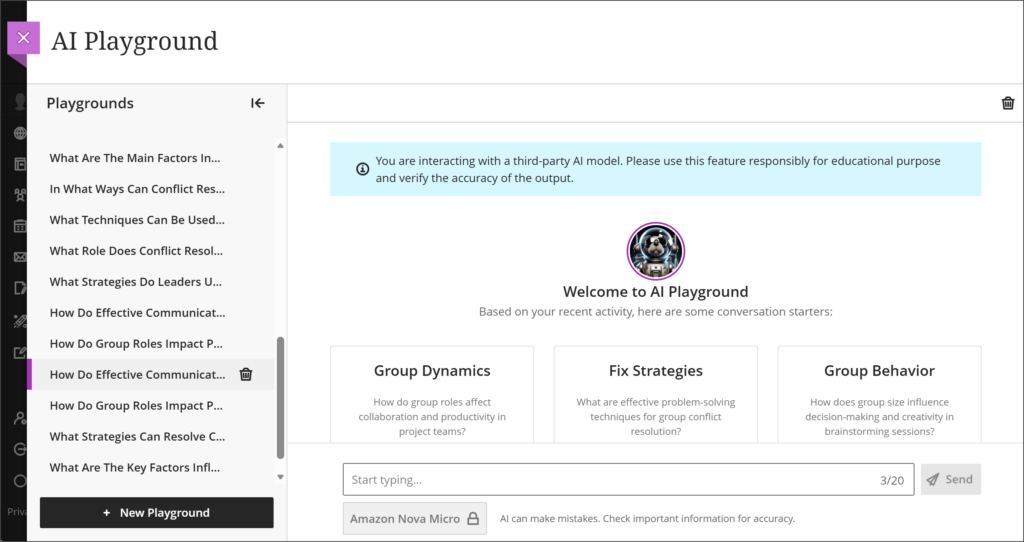
The feature, as implemented, is going to create administrative friction that the current design doesn’t account for. The AI Playground is a system-level tool. It’s either on for everyone or off for everyone. There’s no mechanism to enable it for specific departments, programs, or user groups using the institutional hierarchy. If you’re an admin at an institution where some colleges or departments are enthusiastic adopters and others have formally objected to AI in the classroom, you are now standing between those two camps with no configuration options. Good luck with that faculty senate meeting.
Every instructor I’ve shown this to immediately asked how to enable it in their course. That’s not a coincidence; it’s a signal. The expectation, whether reasonable or not, is that an AI tool for teaching and learning lives inside the course context, not in the base navigation Tools area where students go to access things like Kaltura or publisher integrations. Instructors want to direct students to an AI environment within the context of an assessment or a learning activity, “use the AI Playground to brainstorm your thesis before submitting”, and that use case isn’t supported yet. The last Blackboard LMS roadmap did mention development of a feature like this. But in the current form, the absence is noticeable.
Document attachment, student prompt visibility, and exportable outputs are all missing features that will need to appear. Instructors reasonably want to be able to assign AI-assisted work, review what prompts students submitted, and accept exported Playground conversations as part of deliverables. None of that exists in the current version. For institutions thinking about pedagogical AI integration, not just exploration, the AVA Playground in its current state is a sandbox, not a classroom tool. There’s a meaningful difference.
The Summary Picture
Here’s the quick run of it:
| Feature | Strongest Element | Biggest Gap |
| Revise Submission Feedback | Iterative rewrites, clear AI labeling | Version history too shallow |
| Rubric Feedback Summaries | Leverages existing rubric investment | Can’t read the actual submission |
| Responses to Student Messages | Instructor control, real workload reduction | No source prioritization, no feedback mechanism |
| AI Playground | Equity of access, institutional management | System-level only, no course integration |
My Final Take
If your institution is prepared for it, this is worth adding to the contract with eyes open. The tools are useful. None of them are vaporware. The Responses to Student Messages feature alone is going to save measurable hours at scale, and the rubric feedback generator will reward institutions that have done the hard work of building good rubrics.
The client community will need to continually push for development on the gaps I’ve outlined. If Blackboard’s track record on Video Studio is any indication (and it’s a fair comparison), sustained community pressure does move the needle. Get in the Community forums and Idea Exchange. Bring specifics to your Blackboard account team.
Before you sign a contract addendum, get these tools on in your test environment and in front of your faculty and instructional designers. Skip the vendor webinar and prioritize actual hands-on time with real course content. Whether that means stress-testing with faculty across multiple disciplines, evaluating your current rubric quality, or mapping these features against your institution’s existing AI policy. That feedback is where the real value lies. Your institution’s requirements are specific. Test against them with eyes wide open.
The June 30th deadline is real. Make sure your evaluation isn’t.
Technically Yours,
The Blackboard Guru
